Kids' Guide to 40 Common Programming Terms
Kids' Guide to 40 Common Programming Terms: Your First Step into the Coding World
Coding is a way of giving instructions written for computers and other computerized electronic devices. A computer program is made by writing code in a programming language. This code is something computers can understand. These programming terms for kids might seem new at first. However, they appear in games, web apps,etc. Beginners usually begin with block-based or visual programming tools. These tools simplify learning. Then, they can progress to text-based coding languages used in computer science.
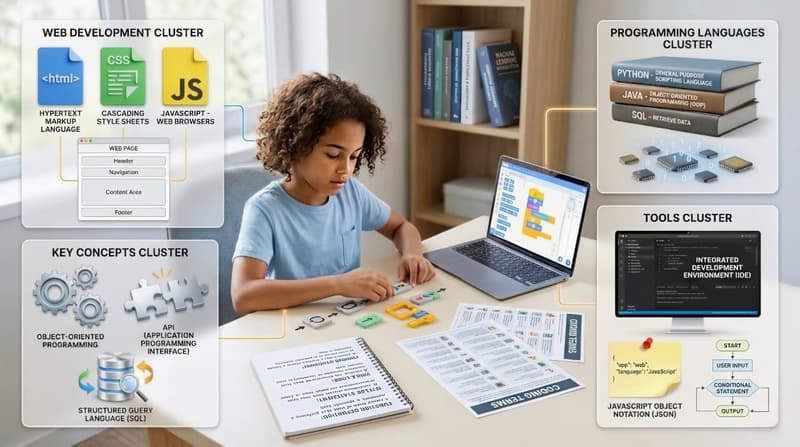
As learners grow, they discover how source code works. They explore functions, conditional statements, and loops. These elements work together within a block of code. Languages like HTML, CSS, and JavaScript help create web pages.
They work in web browsers to build basic websites. Key concepts like object-oriented programming (OOP), application programming interfaces (APIs), and structured query language (SQL) are important in software development. Kids can build confidence by learning programming terms step by step. This helps them write code and create their own programs.
Introduction to Programming Language
A programming language is a way to talk to computers. Computers are smart, but they need clear instructions. These instructions must be in a language they understand. Programmers use coding languages to tell computers how to run games and apps. This is similar to learning a new spoken language.
In English language, words have meaning. In a programming language, commands and symbols also have meaning. Before you can write programs, you need to understand the words. That is why learning programming terms is the first step. Once you know what the words mean, writing code feels easier.
Why Learning Programming Terms Matters
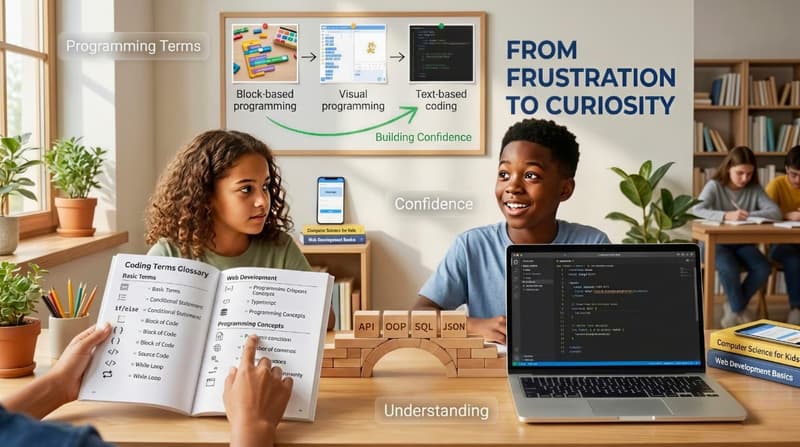
Learning programming terms for kids isn't just about sounding smart. It's about boosting their confidence. When kids learn basic coding terms, they can follow tutorials. They enjoy games and explore programming languages without confusion. Knowing what a computer program, source code, or block of code is can make coding less stressful. Clear vocabulary turns frustration into curiosity.
As kids learn, these programming terms help them write code for web apps, basic websites, and more. Ideas like conditional statements, while loops, and function definitions explain how programs work. Using tools like an integrated development environment and a visual programming language makes learning easier. Confidence grows when kids understand the words behind the code.
Getting Started with Coding Vocabulary
This guide introduces programming terms for kids in a simple and flexible way. You can learn a few words at a time while exploring a programming language or a visual programming language. Parents and teachers can watch as kids start coding and learn how computer programs work. There is no need to memorize everything at once.
The best way to learn coding terms is to use them while building small projects. Kids learn about source code, block coding, and instructions when they make simple websites or web apps. Seeing these programming terms in action makes the learning process feel natural.
Fundamental Programming Concepts
These are the core terms that appear in almost every programming language. Once you understand them, learning new coding languages becomes much easier.
Algorithm: An algorithm is a set of steps to solve a problem. Think about a recipe. First you gather ingredients. Then you mix them. Then you bake. That is an algorithm. In computer science, algorithms help computers know what to do step by step.
Code and Computer Code : Code is a set of instructions written for a computer. Computer code tells a machine how to act. When programmers create games or apps, they write code using special rules. Every block of code has a purpose.
Program and Computer Program : A program is a complete set of instructions that a computer can run. A computer program might be a game, a calculator, or a music app. Multiple programs can run on one device at the same time.
Bug and Coding Errors: A bug is a mistake in the code. Everyone makes coding errors, even expert programmers. Finding these bugs can be part of the fun.
Debug: Debug means finding and fixing bugs. It is like being a detective. You look at the code, test it, and fix what is broken.
Variable: A variable is a place to store information. It can store numbers, words, or other digital data. In games, a variable might store a score or number of lives.
Loop and While Loop: A loop tells the computer to repeat something. A while loop repeats code while a condition is true. This helps code repeatedly without writing the same code again.
Conditional Statement and Else Statement: A conditional statement helps a computer make decisions. If something happens, do this. Else statement means do something different. Games use this all the time.
Event: An event is something that happens, like clicking a button or moving a computer mouse.
Command and Instructions :Commands are instructions written for the computer. Computers follow commands exactly as written.
Programming Languages for Beginners
A programming language is a tool used to give instructions to computers. Think of it like art supplies. A pencil is good for sketching, crayons are great for coloring, and paint works best for artwork. In the same way, different programming languages are used for different jobs. Some are made for games, some for websites, and some for complex programs used in operating systems. Kids often begin with easy languages.
These languages emphasize clear ideas, simple steps, and visual feedback. These languages help young learners grasp how a computer program works. They do this without confusing them with coding jargon. Using simple tools to learn beginner programming words builds confidence. It also makes the learning process fun and steady.
Block-Based Languages (Visual Coding)
A block-based programming language uses visual coding instead of typed commands. Kids drag and drop colorful blocks to create a block of code. Each block represents instructions written for the computer. This style removes the fear of spelling mistakes and syntax errors. It lets kids focus on logic and problem-solving, which are key skills in computer science.
A block is one instruction. A sprite is a character or object on the screen. A script is a group of blocks that work together to perform an action. An event block kicks off the script when something occurs, like a mouse click or a key press. These ideas appear in many visual programming language tools used by kids. By using block-based programming, children start to learn coding language naturally. They also learn how they can reuse the same code to run multiple programs or actions.
Text-Based Languages (Intro Level)
After visual coding, kids slowly move to a text based interface. They start writing code using a keyboard. Instead of dragging blocks, they type instructions using words and symbols. This step introduces real-world software development in a simple way. Kids learn that computers follow rules very strictly. These rules are called syntax. Syntax is like grammar in English language. If the grammar is wrong, the computer does not understand.
A function is a set of instructions that performs a task. It helps avoid writing the same code again and again. User input is information given by the user, like typing a name or clicking a button. Output is what the computer shows back, such as a message, sound, or image. Learning these coding terms helps kids start writing code with confidence. It also prepares them to use popular programming languages later.
Programming Terms in Real Life Applications
Programming terms for kids are not just for lessons. They appear everywhere. In games, scores and lives are stored as digital data. Levels often use a conditional statement to decide what happens next. A while loop can repeat actions like character movement. In apps, buttons are part of the user interface. When you press a button, an event runs a script in the background. Websites use web pages connected through a universal resource locator. Web browsers fetch data and display content with HTML and CSS.
Kids also interact with search engine tools daily. Each click leaves a digital footprint. Web applications rely on source code, APIs, and often JSON to exchange information. Videos and games use machine code, binary digits, and data structures together. Understanding coding vocabulary helps kids realize they already use programming concepts every day.
Practical Applications of Programming Terms
A coding language helps us write instructions for computers and other devices. Programming terms describe how those instructions work. Source code is created by humans. Machine language and machine code are what computers understand. Binary code consists only of zeros and ones. Computer code serves as a link between ideas and actions. Programmers create web and mobile apps. They combine different programming terms to build a working system.
Some languages are compiled languages, which means code is turned into machine code before it runs. Others are scripting language tools that run code line by line. A general-purpose scripting language can do a lot. It handles tasks like web development and automation. Grasping these terms shows kids how complex programs are made from simple ideas.
Integrated Development Environment for Beginners
An integrated development environment is a tool that helps people write programs. It combines a code editor, error checker, and run button in one place. Beginners benefit from this because it shows coding errors clearly. It also helps manage multiple programs and files. Many tools include pre written code and libraries, such as a Javascript library, to save time. Learning how an integrated development environment works prepares kids for future learning in object oriented programming OOP and advanced software development.
Object Oriented Programming OOP Made Easy
Object oriented programming (OOP) is a way to organize code using objects. An object can represent a character, a button, or even a whole web page. Each object has data and actions. This method helps manage complex programs by breaking them into smaller parts. Kids often meet this idea when learning games or animations. Object oriented programming teaches how programmers create systems where the same code can be reused. It is a key idea in many powerful programming language tools.
Programming Terms Used in Web Development
Web development uses many common programming terms. A web page is built using markup language like hypertext markup language and extensible markup language. Design is handled by cascading style sheet or syntactically awesome style sheets
A universal resource locator(URL) points to the page. Search engine tools help people find it. Behind the scenes, structured query language(SQL) helps retrieve data from databases. IP addresses help devices find each other on the internet. Understanding these terms helps kids build basic websites and understand how the web works.
Fun Ways to Remember Programming Terms
Learning should feel playful, not stressful. Kids remember easy coding vocabulary better when they use creativity and repetition. Turning terms into flashcards helps with quick review. Acting out a while loop or an else statement makes abstract ideas physical. Teaching a term to a parent or friend strengthens understanding. Spotting coding terms while playing games builds awareness. Drawing pictures for each word connects ideas to memory.
Next Steps in Your Coding Journey
The best way to learn programming terms is to use them. Kids should start writing small programs, not just reading definitions. Trying beginner platforms helps connect words to actions. Building simple games shows how code repeatedly runs. Watching kid-friendly coding videos adds examples. Over time, kids move from block coding to text based coding and then to more advanced topics like artificial intelligence. Every step builds on the last. Programming terms for kids become natural through practice, not pressure.
Conclusion
Learning programming terms is like learning letters before reading books. Every coder, no matter how skilled, started with simple words. Programming language may seem new, but it is built on clear ideas and logical steps. Stay curious. Take it slow. Coding grows easier with each small win. The goal is not perfection. The goal is understanding and joy in learning.
Comments
Your comment has been submitted